
The RVIC Bible is a free Windows application designed to help you read and study this Bible translation with clarity and confidence. It provides fast navigation by book, chapter, and verse. It also provides tools for searching, cross-referencing, and taking notes as you study.
Like all applications from Red Regent Software, the RVIC Bible is 100% safe to download and contains no bundled adware, spyware, or other unwanted software. You download a single, self-contained installer directly from our site or trusted mirrors, so you stay in control of what is installed on your system.




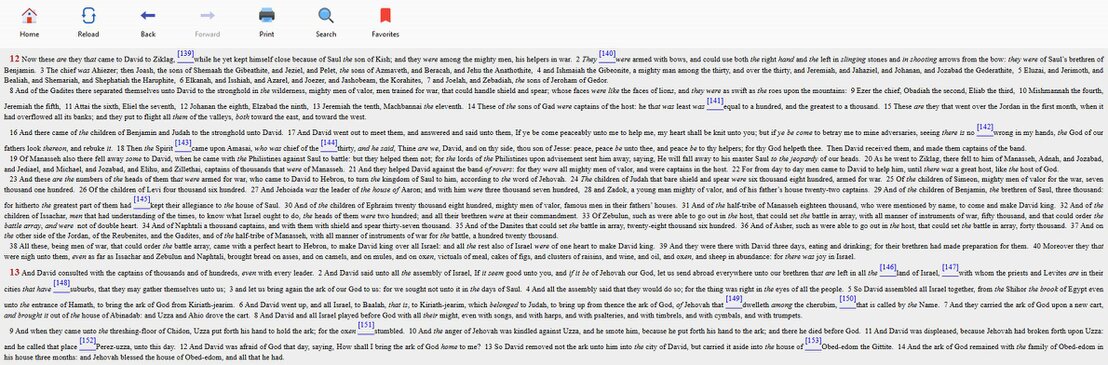

The RVIC
(Revised Version Improved and Corrected) Bible translation builds on the work
of the English Revised Version, using available manuscript evidence to clarify
readings while preserving a reverent, readable style. Its goal is to present a
reliable text that is suitable for careful Bible study as well as regular
reading.
Where
appropriate, the RVIC pays close attention to the underlying Hebrew and Greek
texts, providing improved renderings and marginal notes where textual issues
are significant. RVIC Bible software is centered on this translation, giving
you convenient access to its text, cross-references, and study helps in a
focused, distraction-free environment.
The RVIC is the
result of J.B. Parkinson's research and compilation efforts. The Herald
Magazine supports this Bible translation. If you would like more information
about the RVIC or a hardcopy version of this translation, please visit their
website.
RVIC Bible is designed to fit naturally into your Bible study routine:
- Daily reading: Choose a book and chapter and read straight through, using bookmarks to track your progress.
- Keyword and phrase study: Use the search tool to find all occurrences of a word or phrase, then review the list of hits in context.
- Topic or doctrine study: Combine search with cross-references to compare passages and follow themes through the Old and New Testaments.
- Teaching and sharing: Copy verses into your notes, handouts, or presentations, or print portions directly from the software.
- Offline use: Once installed, RVIC Bible runs entirely on your Windows PC with no ongoing internet connection required.
RVIC Bible is a lightweight Windows desktop application and does not require a high-end system. The table below summarizes the typical requirements and recommendations so you can confirm that your PC is ready before you download.
After downloading the installer, you simply run it, confirm the installation folder, and follow a short setup wizard. No additional toolbars, bundles, or third-party components are installed.
After downloading the installer, you simply run it, confirm the installation folder, and follow a short setup wizard. No additional toolbars, bundles, or third-party components are installed.
| Requirement | Minimum | Recommended |
|---|---|---|
| Operating system | Windows 7 SP1 (32-bit or 64-bit) | Windows 10 or later (64-bit) |
| Processor | 1 GHz or faster | Modern dual-core or better |
| Memory (RAM) | 1 GB | 2 GB or more |
| Disk space | Approx. 100 MB free for program and data | 250 MB free to allow for future updates |
| Display | 800 × 600 resolution | 1280 × 800 or higher |
| Internet | Only needed to download the installer | Optional, for checking for updates via website. |
Use the buttons below to download the latest version of RVIC Bible from Red Regent Software. The installer has been checked before publishing and contains no bundled malware, adware, or unwanted extras.
If you prefer, you can use an alternate mirror. For help installing or upgrading, visit the Support page or the FAQ below, where you will also find answers to common questions about RVIC Bible.
Does RVIC Bible include other translations?
RVIC Bible focuses on the RVIC (Revised Version Improved and Corrected) translation. At this time it does not bundle multiple additional translations.
Can I use RVIC Bible offline?
Yes. After installation, RVIC Bible runs entirely on your Windows computer without needing an internet connection for normal reading and study.
Can I search the contents of the RVIC translation?
How do I report a problem or suggest an improvement?
If you encounter a bug, have trouble installing, or would like to suggest an enhancement, please visit the Support page on this site and contact Red Regent Software with as much detail as possible about your system and the issue.
Is the download safe?
Yes. RVIC Bible is distributed directly by Red Regent Software. Installers are scanned before release and do not include third-party toolbars, adware, or spyware.
RVIC Bible focuses on the RVIC (Revised Version Improved and Corrected) translation. At this time it does not bundle multiple additional translations.
Can I use RVIC Bible offline?
Yes. After installation, RVIC Bible runs entirely on your Windows computer without needing an internet connection for normal reading and study.
Can I search the contents of the RVIC translation?
Yes, the RVIC Bible allows you to search its content and see results as you type.
How do I report a problem or suggest an improvement?
If you encounter a bug, have trouble installing, or would like to suggest an enhancement, please visit the Support page on this site and contact Red Regent Software with as much detail as possible about your system and the issue.
Is the download safe?
Yes. RVIC Bible is distributed directly by Red Regent Software. Installers are scanned before release and do not include third-party toolbars, adware, or spyware.
| Version | Changes |
|---|---|
2.1.1 | Chrome rendering bug may cause duplicate navigation buttons. Click [Reload] to fix. |
2.1.0 | Added splash screen. Changed "Quick Reference" background color. Standardized landing pages. Added "Check for Updates" feature. Improved Help and About screens. Enhanced chapter number display in burgundy font. Enhanced Search. Updated Readme and added License file. |
1.4.0 | Corrected titles in Leviticus, Matthew, Acts, Hebrews, and Testament covers. Updated Home Page on About screen. Corrected internal Product Number. |
1.3.0 | Shortened menu title to "The RVIC Bible" to prevent word wrap. Recompiled for Windows 10 compatibility. |
1.2.0 | Fixed Colossians display issue. Added splash screen. Minor fixes. |
1.1.0 | Shortened application title to "RVIC Bible." Added Readme file. Enabled printing. Updated Setup package. |
1.0.0 | Initial public release. |